01
Infringements found weeks later
An infringement that surfaces at the end of the month is hard to explain and harder to correct. Each file is checked as it arrives, so the driver and the transport manager see it while the day is still fresh.
FleetInspect checks every driver card and vehicle unit file against EU drivers' hours rules (Regulation 561/2006) and road transport working time rules, and grades each infringement on the EU 2024/846 bands. Drivers review and respond in the mobile app, and the transport manager signs each one off.
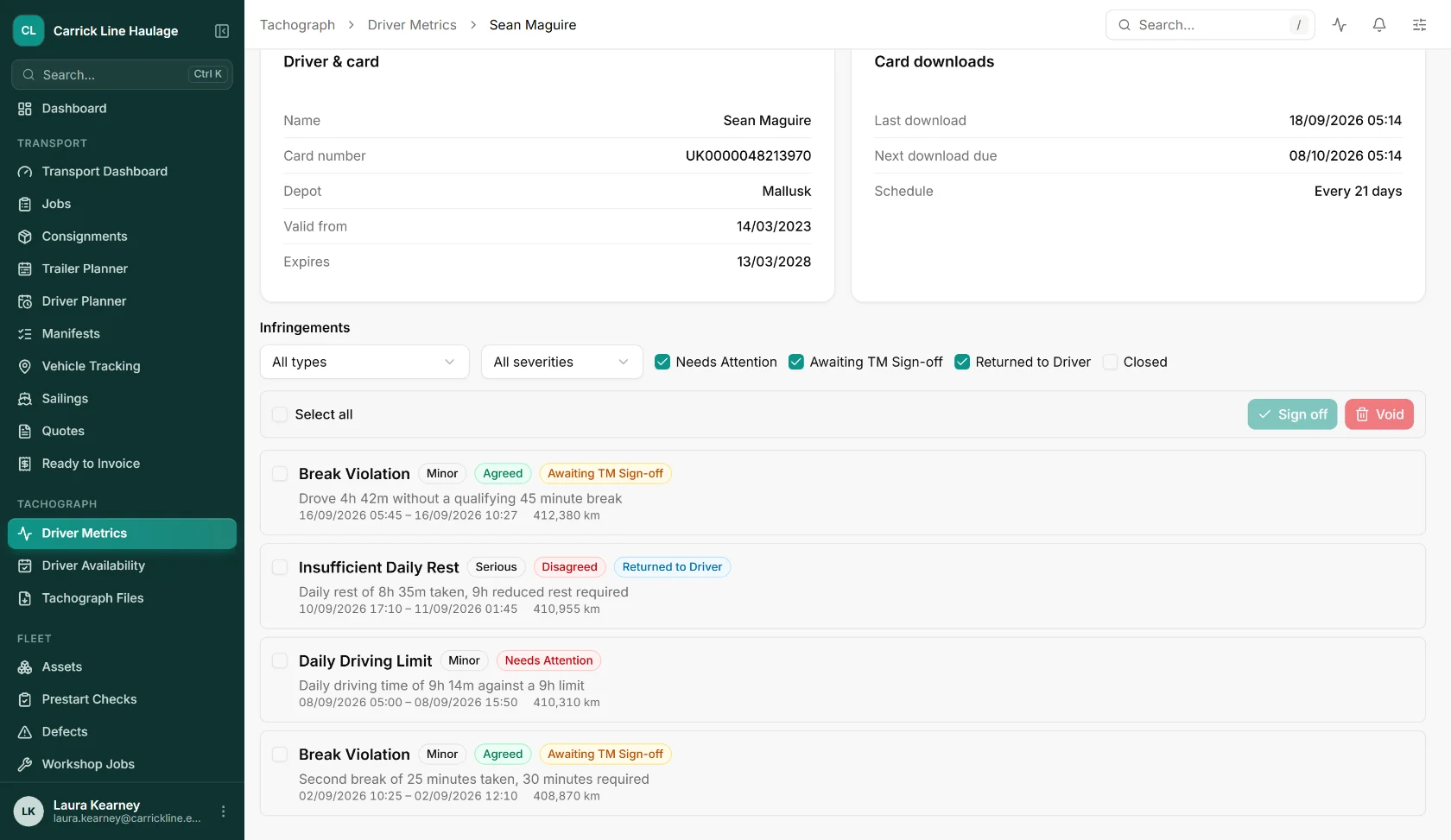
An infringement that surfaces at the end of the month is hard to explain and harder to correct. Each file is checked as it arrives, so the driver and the transport manager see it while the day is still fresh.
Printed reports, signatures chased round the yard, a drawer of forms. Drivers respond to each infringement on their phone and the transport manager signs it off on screen, with the history kept.
Drivers' hours get the attention, but the 48-hour average week and the night work limits catch operators out. FleetInspect checks both sets of rules from the same files and warns when a driver is at risk on the average.
A short break shortfall and a missed weekly rest are not the same risk. Every infringement is graded Minor, Serious, Very Serious or Most Serious, so the serious ones are dealt with first.
Driver card and vehicle unit files arrive by remote download, by hand upload (.ddd, .v1b, .c1b and .tgd) or from another system using an API key. Gen 1, Gen 2 and smart tachograph 2 files are all read.
Each file is checked against EU 561/2006 drivers' hours and road transport working time rules, with recording checks and vehicle unit events alongside, and every infringement is graded.
Drivers see their infringements in the mobile app, agree or disagree with each one, and add a comment and photos. Your company decides whether a comment is required.
Each infringement is signed off, returned to the driver or voided. Infringements below a threshold you set can be signed off automatically, and reports go out as PDF, Excel or CSV on a schedule.
Captured from the shipped web app, showing sample data for an invented haulier.
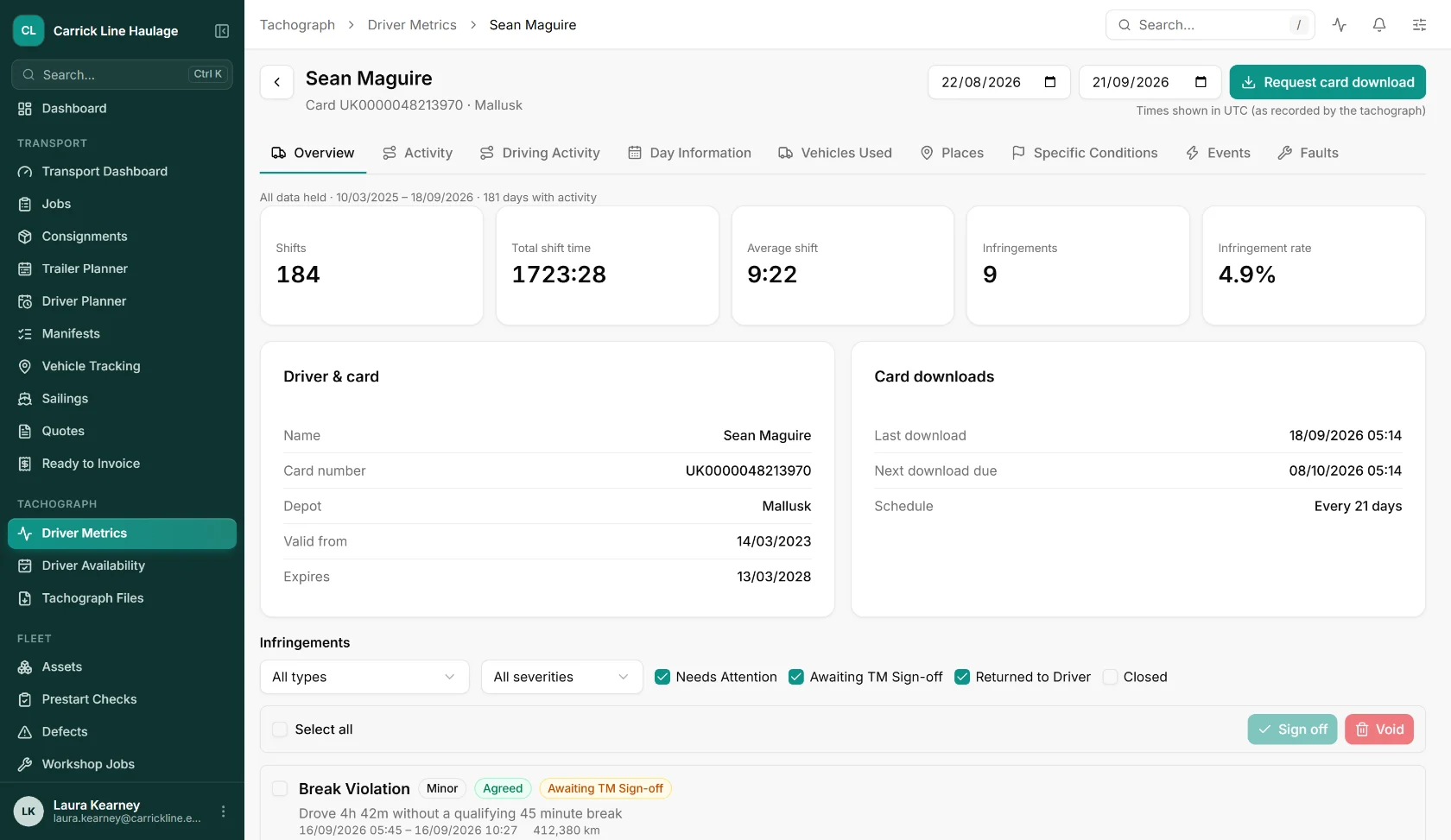
Shifts, total and average shift time, infringements and the infringement rate for the period, next to the driver card details, the last download and when the next one is due.
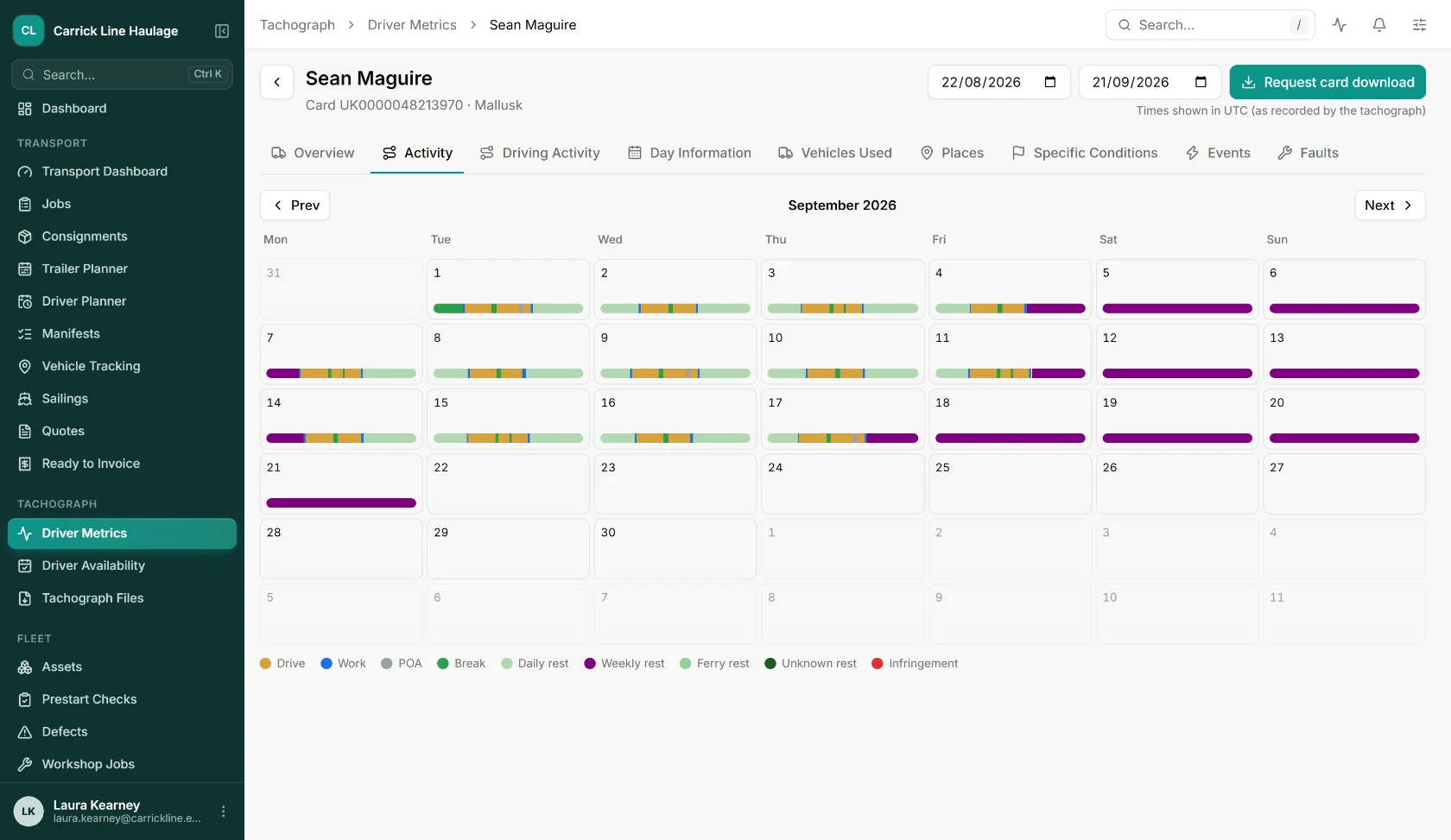
A month of the driver's activity day by day: driving, work, availability, breaks, daily and weekly rest, ferry rest and infringements, with tabs for driving activity, places, events and faults.
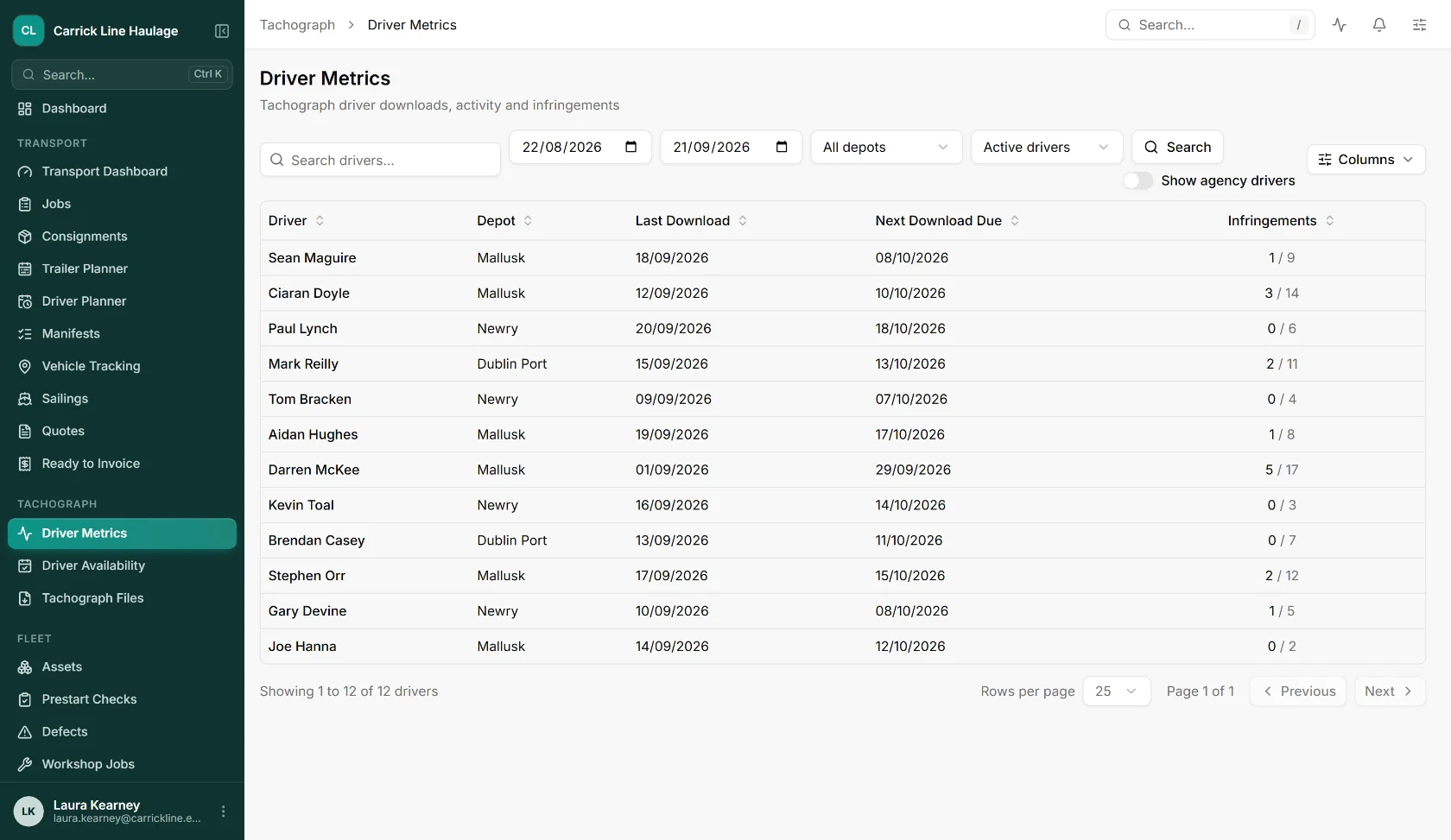
Every driver with their depot, last card download, next download due and infringements, filtered by date range and depot.
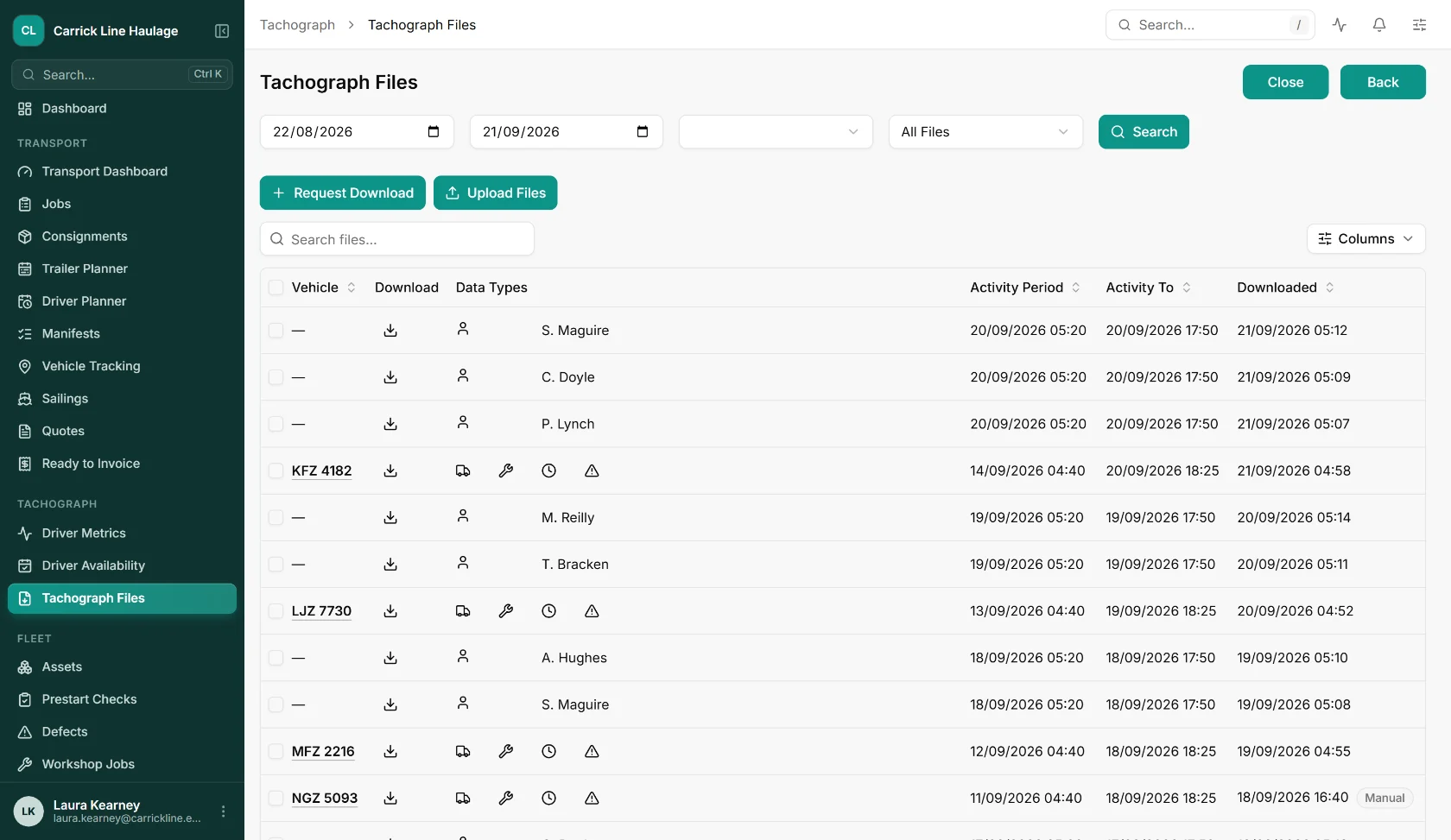
Every driver card and vehicle unit file behind the analysis, with its data types, activity period and download time, whether it came in remotely or by hand.
Take the modules that fit how you work, leave the ones that don't. Every module shares the same data and the same UI.
Drivers' hours and working time checks, graded infringements with driver and transport manager sign-off, and compliance reporting.
Driver card and vehicle unit files collected over the mobile network on a schedule or on request, with no visit to the vehicle.
Current activity, driving status and remaining driving time from connected download devices.
Drivers review and answer their infringements on iOS and Android, with comments and photos.
Straight answers on how FleetInspect analyses tachograph data.
It reads the files downloaded from driver cards and vehicle units, works out each driver's driving, work, breaks and rest, and checks them against the drivers' hours and working time rules. FleetInspect lists every infringement with its severity, sends it to the driver to review and to the transport manager to sign off, and keeps the record.
Drivers' hours under EU Regulation 561/2006: continuous, daily, weekly and fortnightly driving, extended days, daily rest (using the method in European Commission Guidance Note 7), split and reduced rests, weekly rest and compensation, the six 24-hour periods rule, multi-manning, and ferry and train crossings. It also checks road transport working time, under the Road Transport (Working Time) Regulations 2005 in Great Britain and Directive 2002/15 in the EU: the 6-hour rule, breaks, night work, the 60-hour week and the 48-hour average over a 17 to 26 week reference period, with a warning when a driver is at risk.
Every infringement is graded Minor, Serious, Very Serious or Most Serious using the bands in EU 2024/846. Operators in Great Britain see GB infringement codes, and operators in the EU and Ireland see EU codes.
Yes. Each infringement appears in the driver's mobile app, where they agree or disagree with it and can add a comment and photos. The transport manager then signs it off, returns it to the driver or voids it. Whether a comment is required, and whether infringements below a threshold are signed off automatically, are settings for your company.
Yes. Upload .ddd, .v1b, .c1b or .tgd files by hand in the web app, or have another system send them in with an API key you create and can revoke. Gen 1, Gen 2 and smart tachograph 2 files are all read, and with Remote Tachograph Download added the files arrive and are analysed without anyone handling them.
Vehicle unit files are checked for overspeed events, driving without a card, a card inserted while driving, missing mileage, power interruptions and motion sensor errors. Recording checks pick up missing border crossings, country entries and ferry signs, and multi-manning slot errors.
Driver and vehicle reports covering the last download and the next one due, activity calendars and weekly views, events, faults, calibrations with their next due date, company locks and control activity. They export as PDF, Excel or CSV and can be scheduled.
It depends on the modules you take and the number of drivers, so we price it with you rather than publish a number that might not fit. Book a demo and we will give you a written quote for your fleet.
Book a free, no-obligation demo and see how FleetInspect can transform your operations. One email is all it takes.
The link opens a ready-made email in your mail app. Tell us a little about your business and we’ll come back with demo times.
Book a 30-minute walkthrough. We’ll map FleetInspect onto how your operation actually works. No generic demo, no hard pitch.