The daily walkaround check, on the driver's phone.

Drivers do the daily check in the FleetInspect app on iOS or Android, against a checklist you set. Every check is kept with the driver, the time, the odometer reading and the photos, and a failed item becomes a defect for the office to act on.

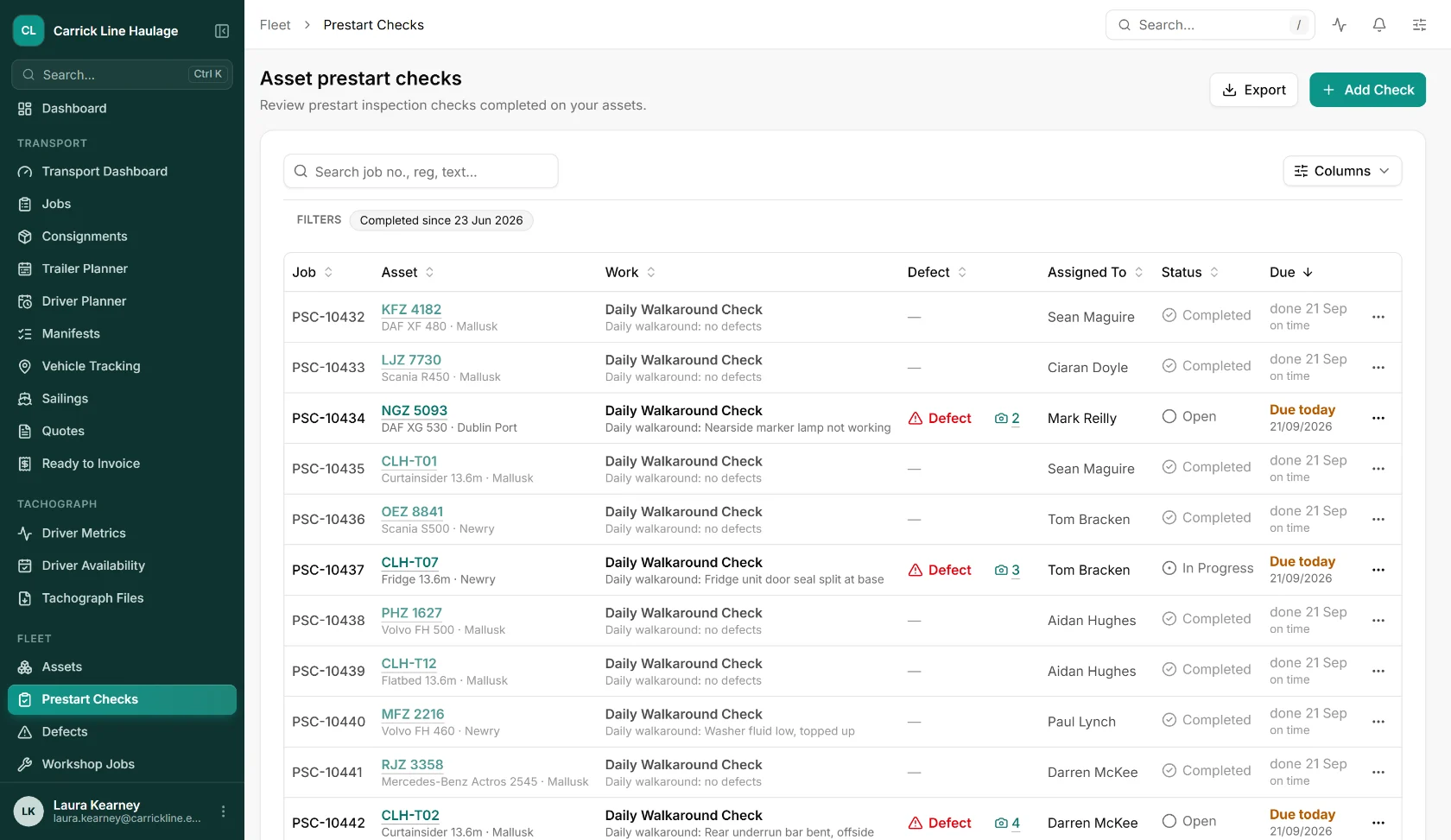
FleetInspect prestart checks register listing daily walkaround checks by vehicle and trailer, with the driver who did each one, defects flagged with photo counts and the status of every check

The problems we built this for

01

Check sheets that stay in the cab

A paper sheet proves nothing until someone collects it, reads it and files it. Each check in the app is stored against the vehicle with the driver, the date and time and the odometer reading, whether or not a defect was found.

02

Defects nobody hears about

A cross on a paper pad can sit for a week. A failed item raises a defect with the driver's note and photos, and notifies the people you have chosen for that vehicle, its depot or the whole fleet.

03

The tick everything check

Mark the items that matter as mandatory, ask for a photo where you want proof, and take the odometer on every check. A reading lower than the last one is refused, and a large jump has to be confirmed.

04

No signal in the yard

Vehicles and checklists are held on the phone, so a check can be done with no signal at all. It is sent when the phone is back online, and a resend never creates a duplicate.

From the cab to the office, in four steps

Step 1

Pick the vehicle

Search by registration, name or asset code, scan a barcode or QR code that carries one of them, or choose from recent vehicles. A vehicle with an open urgent defect is shown as off the road.

Step 2

Enter the reading

The odometer or hours reading is taken on every check and added to the vehicle's mileage record.

Step 3

Work through the list

OK, Defect or not applicable for each item, in the sections you set up. A defect needs a note, and photos come from the camera or the gallery. An item can also be a number with limits, a photo or a signature.

Step 4

Send it

The check appears in the office register as passed or with defects. Each defect is raised at the priority you gave that item, and an urgent one takes the vehicle off the road.

Your modules

Take the modules that fit how you work, leave the ones that don't. Every module shares the same data and the same UI.

✅

Walkaround Checks

Daily checks in the driver app against your own checklist, sold with the service schedule for each asset.

🛠️

Defect Reporting

Defects from a check or reported on their own, followed through to the repair job, the parts and the cost.

🗓️

Service Schedule

Safety inspections, MOTs and calibrations planned for every vehicle and trailer, with reminders before they fall due.

📱

Driver App

Checks, defect reports and tachograph infringements on iOS and Android.

Everything included

  • Checks on iOS and Android
  • Your own checklist, in sections
  • Checklists by asset, category or depot
  • Mandatory items
  • Notes and photos on every defect
  • Number readings checked against limits
  • Signature items
  • Odometer or hours reading on every check
  • Works offline and sends later
  • Barcode and QR code vehicle lookup
  • Nil defect checks kept as records
  • Defects raised from a failed item
  • Checked today count on the dashboard
  • Reports as PDF, Excel or CSV

Still on paper? Start with the sheet.

A printable daily walkaround check sheet for lorries, trailers and vans: the 27 and 19 checks in DVSA guidance, with a driver defect report and the repair sign-off.

Get the check sheet

Common
questions.

Straight answers on daily walkaround checks in FleetInspect.

What is a walkaround check app?

It replaces the paper daily check sheet. The driver works through the checklist on a phone before the vehicle goes out and records any defect with a note and photos, and the result is stored and sent to the office. FleetInspect keeps every check against the vehicle it was done on, including the ones with nothing to report.

Does it follow DVSA's daily walkaround check?

The checklist is yours to set, so it can carry the 27 checks in DVSA's guidance for heavy goods vehicles or the 19 in its guidance for vans, grouped into sections, with anything particular to your vehicles added. Both lists are on our free walkaround check sheet. FleetInspect is not a DVSA product and is not endorsed by DVSA.

Does it work without a mobile signal?

Yes. Vehicles, checklists and questions are stored on the phone, and a check done offline is saved with its answers, photos and signature. It is sent when the phone reconnects, and sending it twice does not create a second check.

Can different vehicles have different checklists?

Yes. A checklist can apply to every asset, to a category or sub-category, to a depot or to a single asset, and a narrower list adds its questions to the broader one. Trailers, rigids, vans and plant are assets in their own right, so a unit and its trailer are two checks.

What can a driver record against each item?

OK, Defect or not applicable, with not applicable removed on the items you mark as mandatory. A defect needs a note and can carry several photos. Other items take a photo, a number checked against limits you set, or a signature. If the driver fixes the fault there and then, they say what they did and it is recorded as repaired.

What happens when a driver reports a defect?

It is raised against the vehicle at the priority you gave that item, and the group you have set for the vehicle, its category, its depot or the company is notified. The office can turn it into a repair job, link it to a job already open or dismiss it. An urgent defect marks the vehicle as off the road, and by default it cannot be checked again or dispatched until the defect is dealt with.

How do we show that the checks were done?

The register on the web lists every check with the vehicle, the driver, the result and any defects, and filters by date, vehicle and result. Any check prints as a PDF with the odometer reading, the answers, the photos and the signature, and the Prestart Checks report exports as PDF, Excel or CSV. The dashboard shows how many of your vehicles have been checked today.

Can a check be done on the website instead?

No. Checks are done in the app, at the vehicle. The web is where the office reviews them, deals with defects and runs reports.

What does it cost?

It depends on the modules you take and the number of vehicles, so we price it with you rather than publish a number that might not fit. Book a demo and we will give you a written quote for your fleet.

Let’s talk about
your business.

Book a free, no-obligation demo and see how FleetInspect can transform your operations. One email is all it takes.

Email us

The link opens a ready-made email in your mail app. Tell us a little about your business and we’ll come back with demo times.

Prefer to call?
We reply within one working day
Ready when you are

See the platform on
your data.

Book a 30-minute walkthrough. We’ll map FleetInspect onto how your operation actually works. No generic demo, no hard pitch.